
Reporting Module
Every user has access to the reporting module, but does not have access to see any reports unless they belong to a role, like Administrator, Branch Administrator, Branch Manager or Underwriter. Below are the various security options:
SECURITY ROLES
- Administrator - Access to all reports
- Branch Administrator - Access to all reports
- Branch Manager - Access to all reports for the branch assigned to (client needs may vary and this role may not have full access)
OTHER ROLES
- Underwriter - Access to "Premium Production" reports but can only see transactions where they are the underwriter
- Employee - These are every day users and do not have access to any reports unless specifically granted access to a specific report
Any user access to a report can be revoked regardless of the role they belong to.
Any user access to a report can be granted even if they are not a member of any roles.
Save Filter
Custom Report Filters
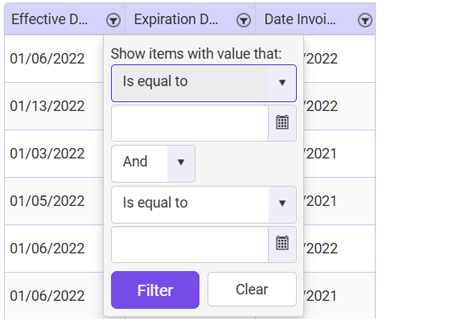
Each column has a filter icon to the right of that column header. Select to see the drop down as shown above. Notice you can have up to 2 filters per column, especially helpful if you need to filter by a date range. The filter types are self explanatory (intuitive) and so easy to figure out and use. Set filters the way you want and save if you intend to use many times later.
- Press FILTER once you have set the way you need to invoke the filter selection.
Saving your filter
Every report in the system has a save option, including Premium Production.

- The settings drop down will show all filters you saved.
- The SAVE icon with the down arrow will save your filter. Just enter a name for the filtered results in the settings box and press that SAVE icon.
- The SAVE icon with the x will delete your filter. Just select the filter to delete and press that SAVE icon.
- The circle arrow icon will clear the current invoked filter.
NOTE - all saved filters are yours only. A user will not see saved filters for other users.
Premium Production Report Section
The rules in this section do not apply to other reports in the system, especially custom reports
- Reports grouped by coverage (LOB) will break out the premium specific to that LOB on multi-LOB policies.
- The premium shown on the report is the "pure premium" only; in other words, less any taxes and fees.
- Canned Reports are designed to print as a PDF in landscape mode.
