Steps to Cancel or Reinstate Policies
To Cancel a Policy:
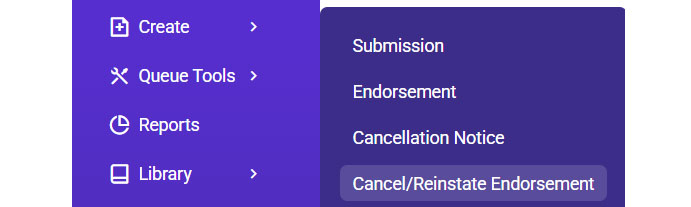
- Go to Create > Cancel/Reinstate Endorsement.
- Locate the policy using Insured Name or Policy Number.
- Enter the Effective Date and Cancellation Reason.

- Verify the Prorated Premium (adjust if required).

- Attach the cancellation notice.

- Send notifications to carriers and agents.
To Reinstate a Policy:
- Follow the same steps as cancellation.
- Update cancellation details to reflect reinstatement.
- Attach the reinstatement document and finalize.

Tips for Endorsements:
- Verify premium impacts for both cancellations and endorsements.
- Ensure proper documentation is attached before processing.